Mini-Game Branding#
Mini-game branding is a ready Re:Activity game dressed in your brand: your character instead of the default hero, your background, your palette and copy written in your brand voice. A giveaway participant in Telegram, VK or MAX opens the post, launches the game and spends minutes inside your branded world instead of a generic template.
In short: branding includes a preset for one game (character, obstacles, pickups, background, palette, interface copy), a demo link for presentations and attachment to any number of your activities at no extra cost. Turnaround is 7 calendar days from brief confirmation, with two concepts to choose from and two free revision rounds. The price is fixed at the moment of ordering and shown in the order form. Currently Pixel Sky Run supports branding, and more games are on the way.
Why brand a game#
A regular giveaway post gets a few seconds of attention. With a mini-game a participant spends minutes, and the whole time your brand is on screen.
Attention goes to the brand, not the game#
In the default game the participant remembers a bird and pipes. In a branded one they remember your character, your colors and your line on the game-over screen. Every "play again" is one more brand contact, and an active participant racks up dozens of them in a single giveaway.
The giveaway looks like your product#
The game launches straight from the activity post and never sends the participant to a third-party site. When it carries your identity, the contest, the post and the game read as one piece with your channel rather than "some external service".
Screenshots work for you#
Participants share their records and screenshots in chats and stories. A screenshot of the default game says nothing about you. A screenshot of the branded one shows your character, your name in the title and your call to action on the result screen.
Brand voice on every screen#
Interface copy is rewritten in your tone. "GAME OVER" can become "YOUR ORDER GOT COLD!", and the "tap to retry" hint can remind about the prize or the promo. Small details, but they turn the game into part of your communication rather than an insert.
Order once, use forever#
A branded preset attaches to any number of your activities. A New Year giveaway, a spring promo, a product launch contest - all on the same game with your look, no repeat orders.
Cheaper and faster than custom development#
Building your own contest game takes months and a team. Here the mechanics, server-side result verification, anti-cheat and social integration are already done. You pay for the look only and get it within a week.
What is included#
Branding is a preset: a set of graphics and settings the game applies on top of its default look.
| Element | What changes |
|---|---|
| Character | Your mascot or brand hero instead of the default one, in every animation phase |
| Obstacles and pickups | Game objects redrawn in your style (for example, sushi rolls instead of pipes and sushi stars instead of plain ones) |
| Background | A branded scene: your city, interior, product or pattern |
| Palette | Sky, ground, accent and interface colors from your brand book |
| Interface copy | Game title, hints, result screen, buttons - in one language, in your brand voice |
| Name and logo | Brand name in the game title, logo and brand graphics in the background or on the start screen |
| Demo link | A ready link to the branded game for internal approvals and teasers in your channel |
| Activity attachment | The preset attaches to any number of your activities, indefinitely and at no extra cost |
What is not included#
- new game mechanics or rule changes (a separate service, see how it differs from custom development);
- a second interface language (each language is a separate preset);
- voice-over and custom sounds;
- source graphics files or handing over the preset for use outside the platform;
- exclusive rights to the game.
Game mechanics, scoring, server-side verification and anti-tampering stay exactly as in the default version. A branded game is the same game in your outfit.
Example: the branded demo#
The sushi-for-all demo preset for Pixel Sky Run shows how far the look can travel from the default. It is a capability showcase, not a customer activity.
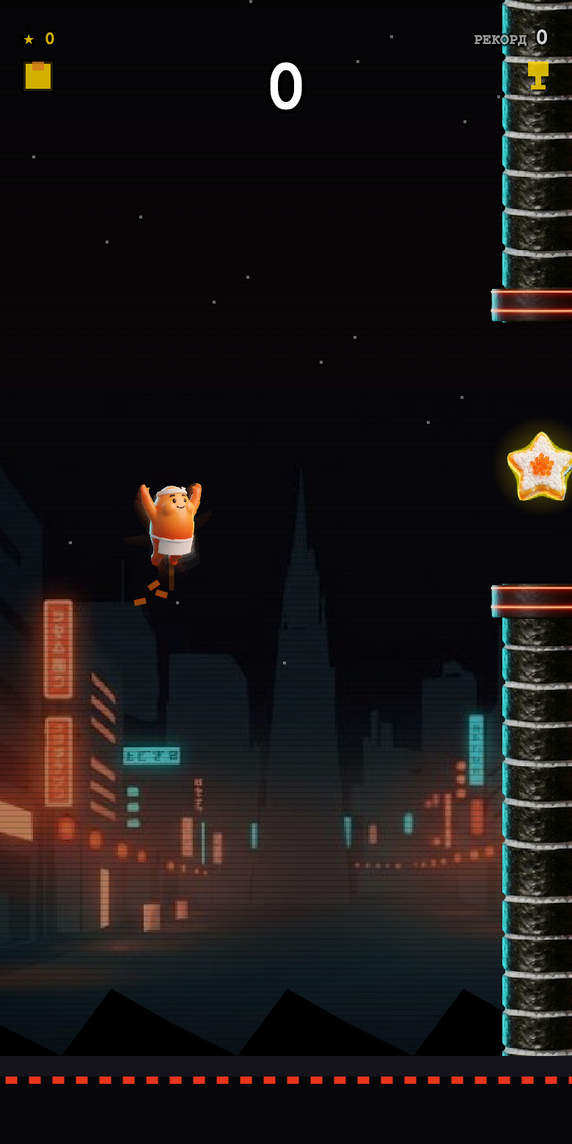
What changed compared to the default game:
- Character. A smiling onigiri in a bandana with three wing-flap phases instead of the pixel bird.
- Obstacles. Nori-wrapped sushi rolls with a neon rim at the gap instead of pipes.
- Pickups. Sushi stars with roe instead of plain stars.
- Background. A night street with neon signs, anchored to the lower part of the screen so the character and obstacles stay readable.
- Palette. Dark background, orange and red neon, yellow interface accents.
- Copy. A brand name in the title, "collect sushi stars between the rolls" as the hint, "YOUR ORDER GOT COLD!" instead of "GAME OVER" and a prize reminder on the result screen.
Open the demo with the button above or via the direct link: /app/games/flappy-bird?mode=demo&brand=sushi-for-all. You get the same kind of link to your own preset once the design is approved.
Price and turnaround#
| Term | Value |
|---|---|
| Price | Fixed at the moment of ordering and shown in the form. Payment by card or with flasks purchased on the platform; orders with an English interface are paid by card in US dollars |
| Turnaround | 7 calendar days from brief confirmation. The brief is confirmed within 1 business day |
| Concepts | 2 design concepts to choose from |
| Revisions | 2 free rounds, each a single consolidated list of comments. Further rounds are paid at 15% of the order amount |
| Discounts | Promo codes apply. With a promo discount, consent to showcase the work in the Re:Activity portfolio is required |
| Plan | Branding is not tied to a plan and is available on any of them, including the free one |
The clock starts at brief confirmation, not at payment: while we wait for your clarifications or concept choice, the countdown is paused. Full terms are in the public branding offer.
How to order#
Orders are placed right on the platform, with no email threads or manual invoices.
- Open activity creation, pick the "Mini-game" type and then a game that supports branding (currently Pixel Sky Run).
- A "Brand this game" block appears under the game with the price, turnaround and number of concepts. Click "Order branding".
- Fill in the brief: describe your brand and wishes, add a link to your channel or a reference post and up to a few reference photos. Advanced settings let you specify the brand name for the title, brand colors in HEX, interface language, mandatory copy, things to avoid and a contact person.
- Accept the offer terms and pay by card or with flasks. The price is fixed at payment.
- Within one business day we confirm the brief or ask clarifying questions in the order chat.
- Seven days after brief confirmation you receive two concepts with a live preview inside the game.
- Approve the one you like or request a revision. Once approved, the preset becomes available in your activities.
All orders, their statuses, design versions and the chat with the designer live on the "Branding orders" page in your profile.
What to prepare#
The more precise the brief, the closer the first concept lands. Useful items:
- logo and brand book, or at least brand colors in HEX;
- links to 2-3 of your posts or creatives whose style should be matched;
- your mascot or character, if you have one, in any form;
- lines that must appear in the game: promo name, prize, slogan;
- restrictions: colors, imagery and words that must not be used.
You must own the materials or have the right to use them.
How to attach it to an activity#
- In the create or edit form of a mini-game activity, pick the "Design variant" and, if there are several, the version.
- Check the result with the "Preview" button.
- Save the activity. Participants see the branded game as soon as they launch it from the post.
One preset can be attached to any number of activities. You can remove it with "Remove branding" while the activity has no participants. Once the first participant joins, the design in that activity is locked until the contest ends, so everyone plays the same game.
Goal parameters, winner selection rules and repeat attempts are configured as usual, see Setting up an activity with a mini-game.
Details worth knowing#
- One preset is one game and one language. A second game or an English version needs a separate order.
- Physics stays default. On request, speed and difficulty can be tuned to the brand, but then results in that activity are not directly comparable with the default game.
- Character and hitbox. A brand character is usually larger than the default bird, so the collision area is tuned separately. That is the designer's job, not yours.
- The background must not fight the game. A busy, bright background hides obstacles, so concepts keep it muted and anchored to the lower part of the screen.
- Copy must not overpromise. In-game lines speak in your voice but must not promise prizes or conditions the activity does not have.
- Versions. Every revision releases a new preset version. Approved versions stay available, and any of them can be selected in an activity.
- Portfolio. We showcase your work in the Re:Activity portfolio only with your permission. The exception is promo-code orders, where consent is mandatory.
Frequently asked questions#
How much does mini-game branding cost?#
The price is fixed at the moment of ordering and shown in the "Brand this game" block when creating an activity. You can pay by bank card or with flasks from your balance; orders with an English interface are paid by card in US dollars. Promo codes apply to branding.
How long does branding take?#
7 calendar days from brief confirmation. The brief is confirmed within one business day after payment. While we wait for your answers or concept choice, the countdown is paused.
Which games can be branded?#
Currently Pixel Sky Run. Other games in the library get branding support over time; the "Brand this game" block appears in the activity form for every supported game.
What should I prepare for the order?#
A free-form description of your brand and wishes, a link to your channel or a reference post, and a few reference photos. A logo, brand colors, a mascot and mandatory lines make the concept more precise, but you can start without them.
Can I use one branded game in several giveaways?#
Yes. An approved preset attaches to any number of your activities indefinitely and at no extra cost. It cannot be transferred to another account or used outside the platform.
Can I change the branding after the activity has started?#
While the activity has no participants - yes, you can switch or remove the design variant and version. After the first participant joins, the design in that activity is locked until the contest ends so everyone plays the same game. For a new look, create a new activity.
Do I need my own designer?#
No. The Re:Activity designer produces the graphics, character, background and copy from your brief. All we need from you is brand materials and feedback on the concepts.
How is branding different from building a custom game?#
Branding changes the look of a ready game: character, background, palette, copy. Mechanics, scoring and result verification stay the same, which is why it takes a week at a fixed price. New mechanics are a separate service with individual estimation; message us through the bots below.
Does branding affect the fairness of results?#
No. A branded game uses the same server-side verification and cryptographic result signature as the default one. Faking a score is just as impossible, see How mini-games work.
Do promo codes apply to branding?#
Yes, a promo code is applied in the order form. With a promo discount you must allow showcasing the work in the Re:Activity portfolio.


